V12.1 Scanning almost inline…
Why minimize such a great feature? Well, because it contains 2 parts… the brand new “inline” scanning feature works in 2 ways. Real inline (next blog) and what could be refferred as semi-inline…
Let’s start with the requirements… you need some time and some space for a first full that is going to run. why? Simply because the major requirement is that guest indexing needs to be activated on the jobs.
Enabling the guest file system indexing has also a small unknown disadvantage. It is actually a small file that is being generated at a full backup for the first time. Veeam will process that data of the machine and will index everything in that file. The main purpose is easy search-ability at Enterprise Manager… for instance for file level recoveries executed (likely with RBAC) by helpdesk engineers that needed to assist on specific requests.
Enabling that for all servers is likely not going to happen in the field as you’ll need some additional rights on those servers and (if not mistaking) it can add up 100MB/1TB of processed data.
So it will likely be active on certain “easy” accessible part of the production environment and not by default on the complete environment.
What is then the purpose: the EXTRA pair of eyes at the sideline that will shout out when there is something wrong in production and your first line of defense didn’t shout out first…(or was on purpose de-activated)
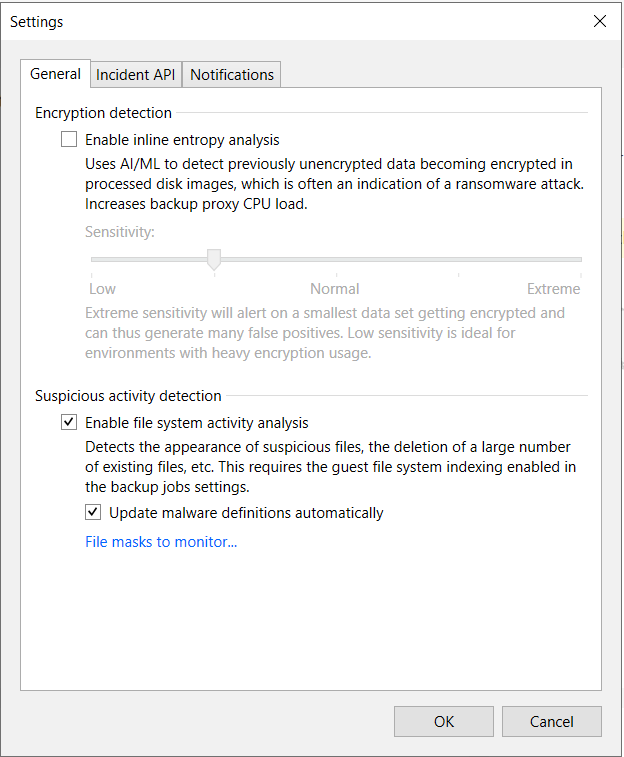
Now how can we detect those anomalities… Well at the moment the indexing-service has finished its work it will pass on a shout-out to the the data analyser service. This one will look over the index and will detect (compared with the previous scan) that “all of a sudden” stuff is (too rapidly) changing.
I always try to compare everything with some sort of a fingerprint. The first time a full scan is done. the fingerprint that is virgin… imagine you work by default on a laptop, during the week our fingerprint will look like exactly the same every day :-)… however in the weekend you went out working in the garden en some scars appeared. This could trigger a “risk”… however it does not need to be… at the moment the risk is too high( you literally scraped half of your finger on a knife) then the alarm goes off.
In IT this could be exactly the same, some changes are still ok, however a sudden bigger change might ring the horn! Example: part of the fileshare is encrypted = perfectly ok if it is classified data and/or the initial one has the same rate of normal vs encrypted data. However a sudden increase might mean 2 things: either some unwanted things happened, or (and never underestimate your clients) your end-users started to work 🙂 (or started a restructure/migration/…)
The other advantage of the guest index file is that we can actually detect some new files were being added that are on the “blacklist”… That is also the reason why it is interesting to activate that update-mechanism ;). And not only new files are important, also the anomality about files suddenly disappearing (delete) or renamed are being detected.
Now if you have V-One things are getting more obvious, plenty of alerts should have warned you already before we are running in the backupwindow.
Regarding backupwindows that suddenly increased –> check the blog-article about suspicious file growths!
So keep in mind…if we detect it (and not your virus-scan) it is already partially too late… and your backups are there to assist you on the restores!