V12.1: Scanning inline
…Now let’s tackle the last possible scanning method by Veeam in the new V12.1 version. It is the most advanced type that we are talking about, but with not too much information to share. Because all the magic happens in Veeam. As an admin you won’t notice a lot of it.
The infra/architecture part:
In short all the magic happens while taking a backup. The role of the proxy here is rather important. Because the component that is taking the backup will take an additional (cpu-)charge for these tasks. First best guesses are up to 15-25% more cpu power. Which is in most cases not a real issue as in most of the cases the proxies that are decently sized for a backup still have cpu-power left over… and in case of a virtual proxy this could mean that every 5 virtual proxys you cold (license-free) deploy another linux proxy to cope with the additional charge IF the backupwindow still needs to be the same.
Consuming more CPU-power that is not available will result in more time required.
The functional part:
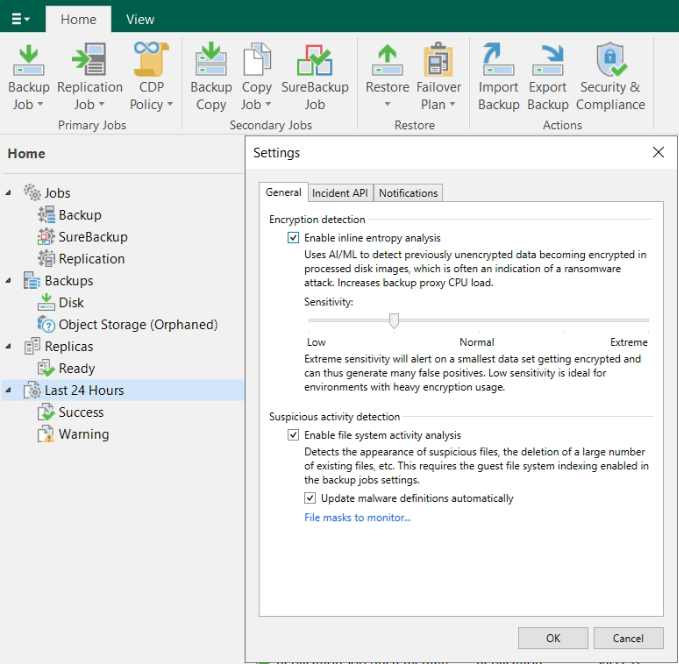
Enabling is again through the hamburger menu. There you’ll find the settings for the “malware detection”. Enabling the first checkbox will do the trick. The default value of the slider is “normal”, but this can be changed. “Extreme” will likely pop up some false positives overtime, and “low” will potentially miss some alerts in a general environment, but is better when encryption is being used…
During the backup we use the proxy-component to tackle the data stream and read in the stream to scan the blocks. So in case we are using VMware, we ask VMware for the changed blocks (with the CBT), we will receive those changed blocks and will “sniff” into them and analyze it is a thread or not. This information is then being captured in a file (RIDX-file) on the proxy for every disk it is processing. When the job finished the file is being transferred to the VBRCatalog and we will kick in the Data-Analyzer service which will compare the current with the previous result.
We will detect encrypted files (depending on the sensitivity level this will generate an event) and text artifacts (like the typical onion-links, and ransomware notes).
Conclusion:
With this final blog, we conclude looping over all the scanning possibilities in the new VBR 12.1. It is a LOT of information on this malware detection topic. And indeed, some of it might be completely irrelevant, because it is a general rule… IF we (Veeam or any other backupvendor) detects something, it is already too late… It means that your last line of defense has detected something that should have been detected earlier at your firewall, anti-virus, … or other security measures taken in the company…